Hylki app icon

Vireo is now Hylki — new name, new icon, same app. What's a hylki and why the change →

A modern email client for the Linux desktop

Hylki is a fast, GNOME-native email client with a three-pane layout, unified inbox, and support for OAuth accounts. Fast to open, effortless to read, and private by default.

  • Open source · AGPLv3
  • Zero telemetry
  • GNOME-native Flatpak
Hylki showing a unified inbox in a three-pane layout: folders and accounts on the left, the message list in the middle, and a conversation open in the reader

Performant & clean

Built in Rust with GTK4 & libadwaita. Instant startup, buttery scrolling, and an interface that stays out of your way.

GNOME Online Accounts & OAuth

Hooks into the accounts you already set up in GNOME Settings — sign in once, and Hylki is ready to go. Gmail and Outlook / Microsoft 365 use modern, token-based sign-in: no app passwords, no fuss.

IMAP push

Real-time delivery over IMAP IDLE. New mail lands the moment it arrives — no polling, no waiting.

Colors, emoji & pictures per account

Give every account its own accent color and an emoji, your initials, or a picture of your choosing — a photo or logo from your computer — so your inboxes are instantly recognizable at a glance.

Shrinkable sidebar

Collapse the folder rail to focus on your mail, or expand it back out. The three-pane layout adapts to any width.

Unified inbox

Inboxes, Starred, Sent, Drafts, Archive, filtered folders and tags each combine every account into a single list, or open to any one account when you need to. The sidebar remembers how you left it.

Message threading

Conversations are grouped into tidy threads, so long back-and-forths read top to bottom without the clutter.

Light & dark mode

Follows your GNOME theme automatically — bright and cheery by day, easy on the eyes at night.

GNOME Contacts & smart compose

Integrates with GNOME Contacts and autocompletes recipients as you type — fully keyboard-navigable, so you can pick an address without ever leaving the keyboard.

Actions palette

Access a quick-action palette on any message in the list — archive, delete, mark read, and flag — without opening the message or hunting through a menu.

Gravatar avatars

Optionally show sender avatars via Gravatar for a friendlier, more scannable list — and flip it off with a single toggle when you’d rather make no avatar lookups at all.

Attachments gallery

Browse every attachment across all your inboxes and folders in one visual grid — image thumbnails and colour-coded file icons — with a full-size preview and a jump straight to the source message.

Pick your app icon

Choose from a whole set of icons — solid colours, patterns, the bird, or the classic envelope — in the setup wizard or in Settings. The dock, app grid and tray follow your choice.

Mail filters

Rules that sort incoming mail by sender, subject or recipient into folders of their own, with live unread counts. Edit them any time, and surface a rule’s folder under All Inboxes.

Spell checking

Misspelled words are underlined as you type, in the subject line and the message body, using the dictionaries installed on your system. Pick the language, and teach it your own words.

OpenPGP, end to end

Read encrypted and signed mail, sign and encrypt what you send, and manage keys from Settings — through the GnuPG already on your computer, with nothing decrypted ever written to disk.

Tags

Label messages with coloured tags, alongside their folder. Stored on the server as IMAP keywords, so Thunderbird and your phone see the same tags — and rules can tag mail as it arrives.

Customize fonts and colours

Show every message in the font, size and colours you choose, with pictures kept and a per-message switch back to the sender's look.

Junk & Trash auto purge

Per account, choose 7, 14 or 30 days and Hylki quietly deletes what has passed its date at each sync — off unless you turn it on.

Swipe to archive or delete

Drag a message sideways with the mouse or two fingers on the trackpad: left deletes, right archives, with a coloured strip naming the action as you go. Swap the sides or turn it off in Settings.

Cloud attachments

Send big files as links. Connect Nextcloud, ownCloud, OpenCloud, OneDrive, Dropbox or Seafile in Settings and the composer uploads to your storage, shares a public link with an expiry and optional password chosen per email, and drops it into the message.

Send later

Pick tomorrow morning, Monday, or any date and time from the Send button's dropdown. The message waits in the Outbox, where you can still edit it, send it now, or delete it, until its time comes.

Send with Hylki from Files

Select files in GNOME Files, right-click, and pick Send with Hylki: a new message opens with them attached. Settings installs the Files extension for you, and the file manager's own “Send by email” opens the same composer.

In your language

Hylki speaks English, French, Hungarian, Portuguese (Portugal and Brazil) and Russian, and follows your desktop's language or the one you pick in Settings. The translations come from the community; to add yours, see issue #155.
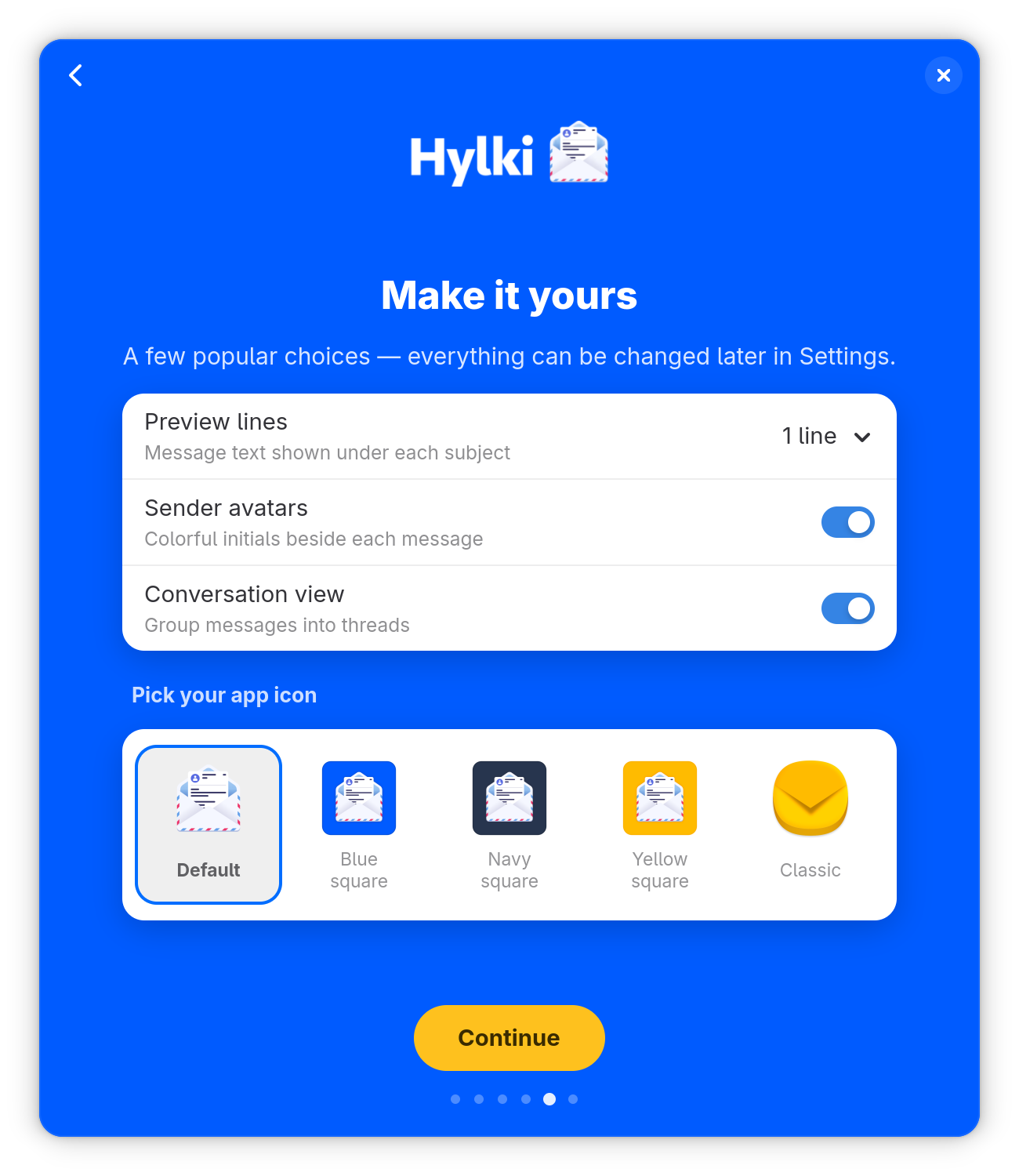
The welcome wizard's Make it yours page: preview lines, sender avatars, conversation view, and a row of app icons to pick from
A friendly first run. The welcome wizard adds your account, walks through a few popular choices, and lets you pick the app icon.
The Settings window on its Conversations page: switches for grouping messages by conversation, expanding them, newest message first, per-message attachments and the attachment drawer, with each option explained in a line beneath
Comprehensive settings. Personalize the app to your email workflow with granular controls for nearly everything.

Privacy-first

Email privacy baked in.

Hylki is built to respect you. No accounts to create with us, no data harvested, nothing phoning home. What happens in your inbox stays on your machine.

  • Zero telemetry

    No analytics, no tracking, no “anonymous usage data.” None.

  • Remote content blocking

    Tracking pixels and remote images are blocked by default, with a per-message “load” banner and a per-sender allowlist.

  • Credentials in the system keyring

    Passwords and tokens live in the OS secret service — never in plaintext on disk.

0 trackers, pixels & telemetry pings

Vireo is now Hylki

Same app, same code, new name and icon. Here is what a hylki is, why the name changed, and what it means for you.

What's a hylki?

Hylki (pronounced HIL-kee) is Icelandic for a case or capsule: the shell that holds and protects what is inside. For an email client with an envelope icon, that metaphor feels just right.

Why the change?

Another project, an email app for macOS, chose the name Vireo about a month before this one did. Its maintainer got in touch, and while the clash was a complete coincidence, the fair thing to do was to pick a new name. The candidates were discussed in the open with the project's contributors, and Hylki won out: unique, not used by any other software, and true to the icon. Read the discussion on GitHub.

What it means for you

  • Vireo 1.34.0 is the last release under the old name. Updates continue as Hylki, from version 1.35.0 on.
  • Install Hylki once; nothing to set up again. Hylki is a separate install that sits alongside Vireo. Its first start carries your accounts, settings and cached mail across, and leaves Vireo untouched until you remove it.
  • Then remove Vireo. Once Hylki is running with your accounts, flatpak uninstall co.hyprlab.Vireo takes the old app away. If Vireo was your default email app, choose Hylki under Default Apps in Settings.
  • Same project, same people, same licence. The code, the AGPLv3, the GitHub repository (now hyprlab/hylki, old links redirect) and the Flatpak repository are all the same; only the name on the door has changed.

Free & open source, forever

Hylki is released under the GNU AGPLv3.

The Hylki Manifesto

Hylki exists to fill a need in the Linux desktop community for a modern, GNOME-native email client that doesn't sacrifice aesthetics for features.

The project has the following foundational values that guide its development:

  • Hylki is committed to free and open source software. Hylki will never be for sale and is committed to remaining that way through our AGPLv3 license adherence.
  • This project is community-driven and committed to putting humans at the center of everything we do. Our aim is to improve the lives of our users and the Linux desktop as a whole.
  • We are committed to GNOME-first development ensuring 100% compatibility with the latest GNOME release. This app was conceived for GNOME and it will remain the desktop environment we target primarily.
  • Aesthetics matter as much as features. Hylki should make using email on the Linux desktop both visually pleasing and enjoyable through consistent and familiar UI/UX paradigms. New users to GNOME should be able to intuit how to use the app without needing to refer to documentation.
  • Feature-rich and choice-forward philosophy. Providing means for the user to maximally customize the app's feature set is a high priority. We maintain that Hylki is both beautiful and highly functional to tackle every email edge case.

Built with AI, shipped by a human

Most of Hylki's code is written with Anthropic's Claude — directed, reviewed and tested by a human maintainer who signs off on every release. The artwork is human-made. And the app itself contains no AI: no AI features, no requests to AI services, and your mail never leaves your machine. Read the full AI notice →

With thanks to Hylki's contributors

Open source means the app is shaped by the people who use it. These folks sent patches that ship in Hylki today — credited on every release and in the app's About window:

  • Anton Palgunov — sender avatars from your GNOME Contacts, and GNOME Online Accounts refinements
  • Isaac — PDF thumbnails, the attachment-opening fix, the reader's To line, and the remote-content preference
  • Alfonso Lizárraga — sending to punctuated recipient names, the startup message list, and the unread dot
  • Chris Pouliot — Proton Bridge connections
  • Alexander Lubovenko — Gmail conversations, and a thorough security review
  • frenchy82 — the French translation, Hylki's first
  • Laszlo Lang — the Hungarian translation
  • Ilya Semenkovich — the Russian translation
  • Paulo Fino — the Portuguese (Portugal) and Brazilian Portuguese translations, and the language chooser request
  • Yiannis Ioannides — the Flatpak install fix, and the requests and design feedback behind tags, split replies and the reader's own font and colours

And not every contribution is code — thanks to p-mitana for a thorough round of design feedback and bug reports that shaped Hylki's reader and composer, and to everyone who files issues and ideas.

Pull requests are welcome — see how contributions are credited →

Give Hylki a try

Download the Flatpakref and open it in GNOME Software to install. Updates then arrive through GNOME Software like any other app.

What you’ll need

  • 64-bit Linux, Intel/AMD or ARM. Both x86_64 and aarch64 (ARM64) are published — Raspberry Pi 4/5, Snapdragon X Elite laptops and ARM virtual machines included. The install file below picks the right build for your machine automatically; there is nothing to choose.
  • Flatpak, with Flathub enabled. Hylki installs from hylki.hyprlab.co, but it runs on the shared GNOME 50 runtime hosted on Flathub — so installing pulls that runtime the first time. Your distro version barely matters as a result; even older LTS releases work.
  • A Wayland or X11 session. Wayland-native, with an X11 fallback.
  • A Secret Service keyring (GNOME Keyring or KWallet). Passwords and tokens live here, never on disk — sign-in won’t persist without one.

Recommended: working GPU drivers (OpenGL / Mesa), ~4 GB RAM, and a GNOME-style desktop — though it runs fine on KDE and others. Uses ~1.1 GB for the shared GNOME runtime (reused across your Flatpak apps) plus ~13 MB for Hylki. Google sign-in and contact autocomplete use GNOME Online Accounts and Contacts when available.

Will it run on my distro?

100% compatible — works out of the box

Fedora, RHEL, and their relatives (Rocky, Alma, CentOS Stream, Nobara, Silverblue…) ship GNOME, the GNOME Keyring, and Flatpak with Flathub already enabled. There’s nothing to set up — passwords are remembered. Just install Hylki:

flatpak install --from https://hylki.hyprlab.co/flatpak/co.hyprlab.Hylki.flatpakref

Found a bug or have a feature idea? The best way to reach the project is to open an issue on GitHub. Please search existing issues first, then include your Hylki version, your GNOME version and distro, and the steps to reproduce.

Hylki is free and open source. If it makes your inbox a little better, consider supporting its development at the link below. Thank you!

Hylki beta app icon

Try the Hylki beta

The beta channel ships upcoming features before they reach the stable release.

⚠️ Beta builds may be buggy and unstable.

These are preview builds for testing: features may change, break, or disappear, and a bad build could misbehave with your mail. The beta shares your accounts, settings and cached mail with the stable app — convenient, but it means a beta bug can affect that shared data. If that doesn't sound like fun, stick with stable Hylki.

The beta installs alongside the stable app with its own icon, clearly labelled Hylki (beta), and picks up your existing accounts automatically — nothing to set up twice. Beta versions carry a -beta.N suffix (for example 1.19.0-beta.2) so you always know which one you're running. Intel/AMD (x86_64) only.

Download the beta

Opening the downloaded file installs it through your software app (GNOME Software, KDE Discover).

Prefer the terminal? Install it with:

flatpak install --from https://hylki.hyprlab.co/flatpak/co.hyprlab.Hylki.Beta.flatpakref

Later beta updates arrive through flatpak update like any other app. Found something broken? Please report it on GitHub and mention the beta version from the About window. To remove the beta, run flatpak uninstall co.hyprlab.Hylki.Beta — your stable install and accounts are untouched.